The screen freezes. The cursor won’t move, the keyboard doesn’t respond. Your hand drifts toward the power button — and right on cue, a voice from childhood surfaces: “Don’t just yank the power like that, you’ll break it.” Is that actually true?
I’ve done exactly this while fixing a friend’s computer: the screen locked up, so I just held the power button until it shut off. My friend gasped. “Wait, you’re not supposed to do that, are you?” That reaction wasn’t baseless panic. It was a habit built on a real danger — one whose actual conditions changed a long time ago.
QUESTION
What actually happens inside a computer the instant you press the power button? Is that button a physical switch that breaks an electrical circuit, or is it something else entirely? And the well-known trick of holding the button down for four seconds to force-kill a frozen machine — how, exactly, does that differ from a single quick press?
Answering this properly means splitting it into three questions. First: is the power button really a switch that cuts a circuit? Second: if not, what signal actually travels when you press it? Third: how much of “forced shutdown is bad for your computer” is true, and where does it turn into exaggeration? The answer isn’t found by tracing a wire — it’s found in the standards documents that hardware and operating systems have shared for decades.
CHECK
It really was just a switch, once
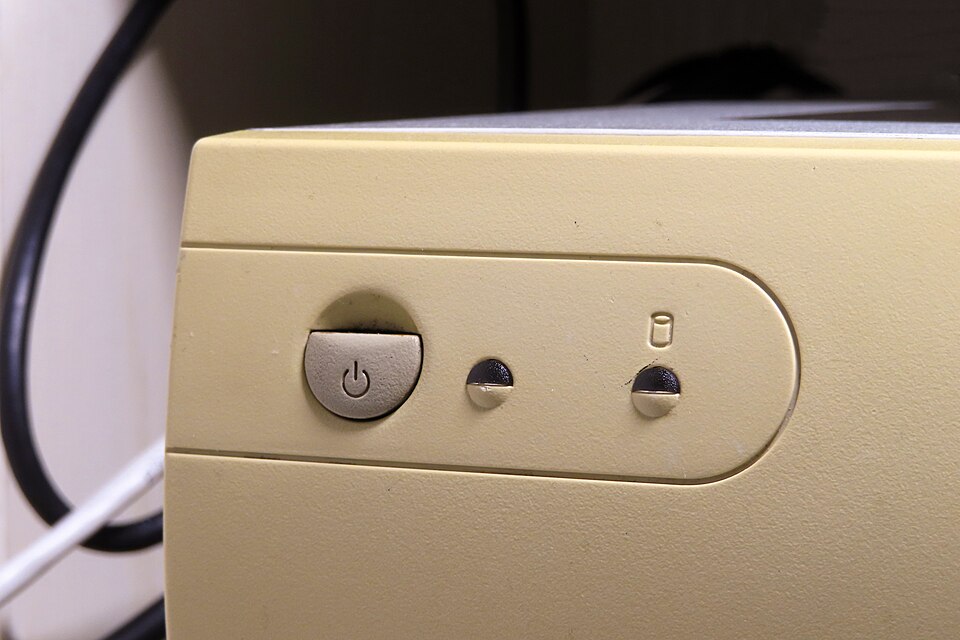
The old belief wasn’t entirely wrong. In the AT-style computer cases common from the 1980s through the mid-1990s, the power button was a mechanical switch wired directly — through a four-wire connector — into the AC input line of the power supply unit (PSU). Pressing it physically cut the AC power on the spot. What the operating system happened to be doing at that moment was irrelevant.[1] By that era’s rules, “don’t just hit the power button” was literally correct advice: whether or not the disk was mid-write, power died the instant the button was pressed.
.jpg)
What ATX changed: the button became a request
That design was fundamentally rewritten by the ATX specification Intel published in 1997 (ATX Specification, Version 2.01).[2] Post-ATX power buttons became momentary-contact switches, no longer wired directly into the AC line at all. Instead, the button does nothing but send a signal to the motherboard. The power supply keeps a standby voltage (typically 5V) running at all times, even while the machine is “off,” and only releases the rest of its output when the motherboard tells it to — through a signal line called PS_ON# — to turn main power on or off.[2] This scheme is commonly called “soft power.” The final say over whether power flows moved from a physical switch to logic — and, above that logic, to software.
The practical consequence is significant. Where the button used to be the thing that cut electricity, now there is a judgment call interposed between pressing the button and power actually being cut. That judgment call belongs to the operating system.
What signal actually fires when you press the button
So what signal travels when you press it? The answer doesn’t come from an internal Intel spec, but from ACPI (Advanced Configuration and Power Interface) — the international technical standard for power and configuration management, originally co-authored by Microsoft, Intel, and Toshiba, and now maintained by the UEFI Forum.
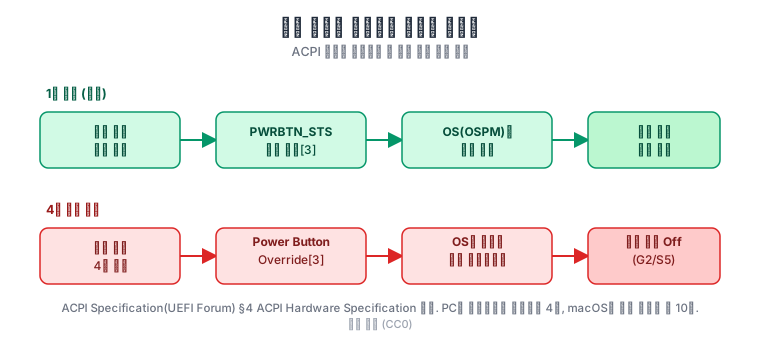
The ACPI specification defines a short press of the power button as unconditionally setting a status bit called PWRBTN_STS.[3] Once that bit is set, the OS’s power-management software (the spec calls it OSPM) detects it and begins a normal shutdown sequence — closing open files, flushing cached writes to disk, and so on. In other words, a quick tap of the power button isn’t a switch at all — it’s a request asking the OS to shut itself down. The entity that actually cuts power is the OS that received the request.
What four seconds means: a separate path that bypasses the OS
So what’s different about the well-known “hold it for four seconds to force-kill a frozen machine”? This isn’t an extension of the same signal — it’s a completely separate hardware path. The ACPI spec defines it as its own item called “Power Button Override.” It functions as a fail-safe for cases where the OS’s power-management software has stopped responding: if the user holds the power button down for four seconds or more, the hardware forces the system into a full shutdown (ACPI terms this G2/S5, commonly called “soft off”) without any OS involvement whatsoever.[3] Because this behavior lives in the hardware circuit’s own logic, it fires without exception even if the screen is frozen and the OS isn’t responding at all.
That four-second figure isn’t just a spec-level abstraction — it’s implemented that way in real silicon. Intel’s datasheet for the 500 Series Chipset Family PCH (Platform Controller Hub) explicitly states that holding the power button for four seconds or more triggers a Power Button Override event.[4] “Four seconds,” in other words, isn’t a number that circulated as internet folklore — it’s a figure where the standards document and the actual chipset specification agree.
So is forcing a shutdown actually dangerous — only conditionally
This is where the myth’s core claim needs testing. “Forcing a shutdown is bad for your computer” is only half true. The danger isn’t the act of holding the button past four seconds — it’s that doing so skips the OS’s normal shutdown sequence entirely. That sequence includes closing open files and actually flushing pending writes from memory to disk. A forced shutdown skips this, so if something happened to be mid-write at that exact instant, that file’s contents can be left incomplete.
There’s an important qualifier here, though. Most modern filesystems use journaling — logging a filesystem’s structural changes ahead of time before committing them. Windows’ NTFS writes metadata changes (structural information like file size, location, and name) to a log file before applying them, so that even if power drops suddenly, the filesystem’s structure itself can be recovered to a consistent state by replaying that log on the next boot.[5] macOS’s APFS works on a different mechanism toward the same goal: instead of overwriting existing metadata in place, it writes new records and then simply repoints the pointer — a copy-on-write approach designed so a crash never leaves a half-written, corrupted record behind.[6]
The catch is that journaling and copy-on-write protect the structure of the filesystem, not the contents of the specific file being written at that moment. Force-killing a computer while a document is mid-save won’t corrupt the folder structure or other files, but that specific document can be left with the save incomplete. So the risk of a forced shutdown is neither “always present” nor “never present” — it hinges entirely on whether a write operation happened to be in progress. A computer that’s simply frozen and doing essentially nothing has almost nothing to lose from a forced shutdown.
The myth’s actual root wasn’t the power button — it was the hard drive
So where did the fear of “never just hit the power button” actually come from? The answer isn’t the button — it’s the hard drive. Hard disk drives common from the 1980s through the early 1990s were built so that, the moment power cut out, the thin read/write head would simply drop onto the spinning platter as it wound down. A head landing unprotected on the data-bearing surface risked scratches or data damage on impact, so users of that era had to run a separate utility — such as HDPARK.EXE — before shutting down, to move the head off the data area and onto a safe “landing zone” at the platter’s edge.[7] Forgetting that manual step and simply cutting power was the genuinely dangerous act back then, and the warning “don’t just kill the power” traces directly back to that hard-drive handling ritual — not to the button itself.
That problem was later resolved through standardization. The ATA/ATAPI standard governing hard-drive command sets — set by the international T13 technical committee — mandated commands like STANDBY IMMEDIATE that automatically retract the head to a safe zone before power is cut.[8] Today’s SMART (Self-Monitoring, Analysis and Reporting Technology) diagnostic attribute 193 (Load Cycle Count, hex code 0xC1) — which tracks how many times a drive’s head has been parked — is a direct descendant of that automated process.[9] In short: the thing the myth was actually afraid of, manual head-parking, was automated out of existence by standardization decades ago. All that’s left is an old habit attached to a problem that no longer exists.
What “left running” actually means — it’s usually asleep
Here’s a genuinely counterintuitive point worth pausing on. We commonly say a computer has been “left running for days,” but that phrasing itself is inaccurate. The ACPI standard divides power states into a spectrum running from S0 (fully operating) to S5 (fully off).[10] Most computers sitting idle with a blank screen aren’t in S0 at all — they’re in S3 (sleep, which keeps memory powered while cutting everything else) or S4 (hibernation, which writes memory contents to disk and cuts power entirely).
Modern devices go a step further, supporting Modern Standby — a low-power idle mode reached from inside S0 itself (Microsoft’s documentation labels it “S0 low-power idle”; hardware vendors like Intel colloquially call it S0ix).[10] In this mode, the screen going dark looks identical from the outside, but most of the system has already dropped into a low-power state underneath. In other words, “the screen is off” alone tells you nothing about whether a machine is truly running or asleep. Most of the time, it’s the latter.
So why does a reboot ever become necessary? The reason is straightforward: sleep states (S3, S4, Modern Standby) keep the kernel and driver code already loaded in memory exactly as-is while only cutting power — they can’t swap that code out for a new update. Microsoft’s own support documentation explains that a reboot is required whenever a security update needs to replace files (such as DLLs) that are already in use by running processes.[11] Turning the screen off and on via sleep doesn’t trigger that replacement, which is why “restart to finish installing an update” remains, without exception, genuinely necessary.
The official “shut down” path each OS documents — and how differently they document it
Now that we’ve confirmed the power button is really a signal, it’s worth looking at how each operating system documents the official path that substitutes for it. Windows and macOS make for an interesting contrast here.
Windows offers the Win+X menu (sometimes called the Quick Link menu or power-user menu), whose existence Microsoft confirms in official support documentation.[12] Once that menu opens, each item shows an underlined letter — the standard Windows menu convention of an access key, where pressing that letter on the keyboard jumps straight to the corresponding item. Following that convention, pressing Win+X, then U (the Shut down or sign out submenu), then U again (Shut down) reliably produces the same result every time: the system shuts down.[13] One nuance is worth being precise about, though: what Microsoft’s official documentation confirms is the existence of the menu itself — there isn’t a single official sentence stating outright that “Win+X, U, U is the shutdown shortcut.” So this is less an official keyboard shortcut and more a deterministic path through an officially documented menu structure, navigated via the standard access-key convention.
macOS is the mirror image. Apple’s official support documentation states, in a single explicit sentence, that on laptop keyboards, pressing Control-Option-Command-Power closes every open app and then shuts the system down, prompting you to save any unsaved changes along the way.[14] So where Windows offers a path through a menu, macOS documents a single key combination as the official shortcut from the outset. That the two systems accomplish the same goal through such different documentation styles says something about how differently they treat power management at the OS layer.
Zooming out: PCs, Macs, and phones use different standards, but the same underlying logic
Everything so far has followed a single standard, ACPI, across PCs. Macs and smartphones don’t use ACPI at all — and yet the underlying structure turns out to be strikingly similar.
Macs running macOS use their own power-management system instead of ACPI (a separate controller called the SMC on Intel-based Macs, integrated into the SoC on Apple Silicon). The internal implementation isn’t public, but the externally visible behavior is confirmed in Apple’s own support documentation: when a Mac stops responding, holding the power button for up to 10 seconds forces it off.[15] Compared to the PC’s 4-second ACPI override, that’s the same underlying principle — “hold it down and hardware forces a shutdown” — implemented by a different manufacturer with a different number.
Smartphones diverge even further. They don’t use ACPI at all, relying instead on their own power-management circuitry integrated into a PMIC (power management IC) or SoC (system-on-chip). And yet the logic still splits into the same two branches. A short press sends a shutdown or restart signal to the OS; a defined button combination or a sustained hold forces a hardware-level restart that bypasses the OS entirely. Apple’s official support documentation specifies the force-restart procedure for iPhone models with Face ID as a fixed button sequence: press and quickly release Volume Up, press and quickly release Volume Down, then press and hold the side button until the Apple logo appears.[16] What determines the outcome here is sequence, not duration — a departure from how PCs and Macs handle it.
Google’s Pixel line uses yet another number. Google’s official support documentation states that holding a Pixel’s power button for up to 60 seconds turns the screen off and forces a restart.[17] Four seconds for a PC, ten for a Mac, sixty for a Pixel. All three share the exact same underlying principle — hold it long enough, and hardware bypasses the OS to force the issue — while each manufacturer has picked its own threshold.
| Device | Standard / system | Force-intervention trigger | Source |
|---|---|---|---|
| PC (Windows, etc.) | ACPI (UEFI Forum) | Hold 4+ seconds | ACPI Specification §4[3], Intel PCH datasheet[4] |
| Mac | Proprietary power management (SMC / Apple Silicon) | Hold ~10+ seconds | Apple official support documentation[15] |
| iPhone (Face ID models) | Proprietary PMIC/SoC | Fixed button sequence (not duration-based) | Apple official support documentation[16] |
| Google Pixel | Proprietary PMIC/SoC | Hold 60+ seconds | Google official support documentation[17] |
FACT
The power button isn’t a circuit — it’s a signal. A short press sets the PWRBTN_STS bit defined by the ACPI standard, and the OS that receives that request cleans up after itself before shutting down.[3] The only thing that actually forces power off against the OS’s will is a separate hardware path — the Power Button Override — that only activates when you hold the button past four seconds and bypasses the OS entirely.[3][4] And even that forced path is only genuinely risky if something happened to be mid-write at that exact instant.
Trace the myth back to its root and a more interesting fact emerges. The fear was never really about the power button at all — it was created by old hard drives, and that danger was engineered away decades ago through the ATA standard’s automatic head-parking.[7][8] What’s left is an old habit clinging to a problem that’s already been solved. And “a computer left running for days” is also half wrong: if the screen is dark, that machine is usually not working at all — it’s napping in S3 or Modern Standby.[10] Four seconds for a PC, ten for a Mac, sixty for a Google Pixel — the same underlying idea, implemented as three different numbers by three different companies. That’s a surprisingly long stretch of time to spend hovering a finger over a button, waiting for a frozen screen to respond.
References
[1]: Power-switch design in AT-style computer cases — a mechanical switch wired via a four-wire cable directly into the power supply’s AC input, cutting power the instant it was pressed. ADL Embedded Solutions, “What Is The Difference Between AT vs ATX Power Supplies?” https://www.adl-usa.com/support/faqs/what-is-the-difference-between-at-vs-atx-power-supplies/
[2]: ATX Specification, Version 2.01 (Intel Corporation, February 1997) — soft-power control via the PS_ON# signal. The power button became a momentary switch that only sends a signal to the motherboard; the power supply maintains standby power at all times and turns main power on/off only via the PS_ON# signal. https://www.bitsavers.org/pdf/intel/ATX/ATX_Specification_2.01_199702.PDF
[3]: ACPI Specification (UEFI Forum, current 6.5 edition), §4 “ACPI Hardware Specification” — a short press of the power button unconditionally sets the PWRBTN_STS bit, prompting the OS (OSPM) to begin a normal shutdown sequence; holding it 4+ seconds triggers “Power Button Override,” forcing the system into soft-off (G2/S5) without OS involvement. https://uefi.org/specs/ACPI/6.5/04_ACPI_Hardware_Specification.html
[4]: Intel, “Intel 500 Series Chipset Family On-Package Platform Controller Hub Datasheet” — confirms at the chipset-implementation level that holding the power button 4+ seconds triggers a Power Button Override event. https://edc.intel.com/content/www/us/en/design/ipla/software-development-platforms/client/platforms/tiger-lake-mobile-y/intel-500-series-chipset-family-on-package-platform-controller-hub-datasheet-v/006/sleep-states/
[5]: Microsoft Learn, “NTFS overview” — NTFS is a transactional journaling filesystem that logs metadata changes to a log file ($LogFile) before committing them; what the log guarantees is structural filesystem consistency, not the content of user data itself. https://learn.microsoft.com/en-us/windows-server/storage/file-server/ntfs-overview
[6]: Apple Developer, “Apple File System Guide — Features” — APFS’s copy-on-write metadata scheme prevents corrupted records from being created if a crash occurs. https://developer.apple.com/library/archive/documentation/FileManagement/Conceptual/APFS_Guide/Features/Features.html
[7]: Common practice among hard-drive users in the 1980s and early 1990s — utilities such as HDPARK.EXE had to be run before cutting power, to manually move the head to a landing zone. Consistently documented in period PC hardware reference material. Computer Hope, “What Is Park in Computing?” https://www.computerhope.com/jargon/p/park.htm; Backblaze, “A History of Hard Disk Drives (HDD) From the Beginning to Today” (documents manufacturer-specific manual parking utilities such as Seagate’s PARK.EXE/PARK.COM and Western Digital’s PARKIDE) https://www.backblaze.com/blog/history-hard-drives/
[8]: ATA/ATAPI Command Set standard (set by the T13 technical committee) — mandates commands such as STANDBY IMMEDIATE that automatically move the head to a safe landing zone before power is cut. AT Attachment 8 - ATA/ATAPI Command Set (ACS), T13/1699-D. https://read.seas.harvard.edu/cs161/2024/pdf/ata-atapi-8.pdf
[9]: SMART (Self-Monitoring, Analysis and Reporting Technology) attribute 193 (Load Cycle Count, hex code 0xC1) — the industry-standard metric tracking the cumulative number of times a drive’s head has parked. Acronis Knowledge Base, “S.M.A.R.T. Attribute: Load Cycle Count; Load/Unload Cycle Count.” https://kb.acronis.com/content/9128
[10]: Microsoft Learn, “System power states” — defines ACPI power states from S0 (working) through S5 (soft off), and describes the low-power S0 idle mode supported by some SoC-based systems (officially named Modern Standby, documented as “S0 low-power idle”). The term “S0ix,” commonly used in the hardware industry, does not appear in this document itself — it’s terminology used in silicon-vendor documentation such as Intel’s. https://learn.microsoft.com/en-us/windows/win32/power/system-power-states
[11]: Microsoft, “Why you may be prompted to restart your computer after you install a software update” — explains that a reboot is required when a security update needs to replace files (such as DLLs) already in use by running processes. https://support.microsoft.com/en-us/help/887012/why-you-may-be-prompted-to-restart-your-computer-after-you-install-a-s
[12]: Microsoft Support, “Keyboard shortcuts in Windows” — officially confirms the existence of the Win+X Quick Link (power-user) menu. https://support.microsoft.com/en-us/windows/keyboard-shortcuts-in-windows-dcc61a57-8ff0-cffe-9796-cb9706c75eec
[13]: The shutdown path via the Win+X menu’s underlined access keys (U→U, etc.) — a deterministic outcome of Windows’ standard access-key menu convention. How-To Geek, “How to Access Windows 10’s Hidden Power User Menu.” https://www.howtogeek.com/742208/how-to-access-windows-10s-hidden-power-user-menu/
[14]: Apple Support, “Mac keyboard shortcuts” — Control-Option-Command-Power: quits all open apps and shuts down, prompting to save any unsaved changes. https://support.apple.com/en-us/102650
[15]: Apple Support, “How to force an app to quit on Mac” — when a Mac stops responding, holding the power button (or Touch ID button) for up to 10 seconds forces it to shut down. https://support.apple.com/en-us/102586
[16]: Apple Support, “Force restart iPhone” — for iPhone models with Face ID, the force-restart procedure: press and release Volume Up, press and release Volume Down, then press and hold the side button until the Apple logo appears. https://support.apple.com/guide/iphone/force-restart-iphone-iph8903c3ee6/ios
[17]: Google, Pixel Phone Help, “Turn your phone on or off” — holding the power button for up to 60 seconds forces a restart. https://support.google.com/pixelphone/answer/7374159?hl=en